Historia 1.0.0.Beta1: Introducing the Web Application
I’m thrilled to announce the release of Historia 1.0.0.Beta1, a significant milestone for the project! This release introduces a powerful new web application module that makes Historia more accessible and user-friendly than ever before. Building upon the foundation established in the alpha releases, the web application transforms Historia from a command-line tool into a full-featured web service with rich visualizations and collaborative capabilities.
What’s New in 1.0.0.Beta1?
The centerpiece of this release is the new web application module, which provides a comprehensive interface for interacting with Historia’s core functionality. Let’s explore the key features that make this release special:
User-Friendly Interface
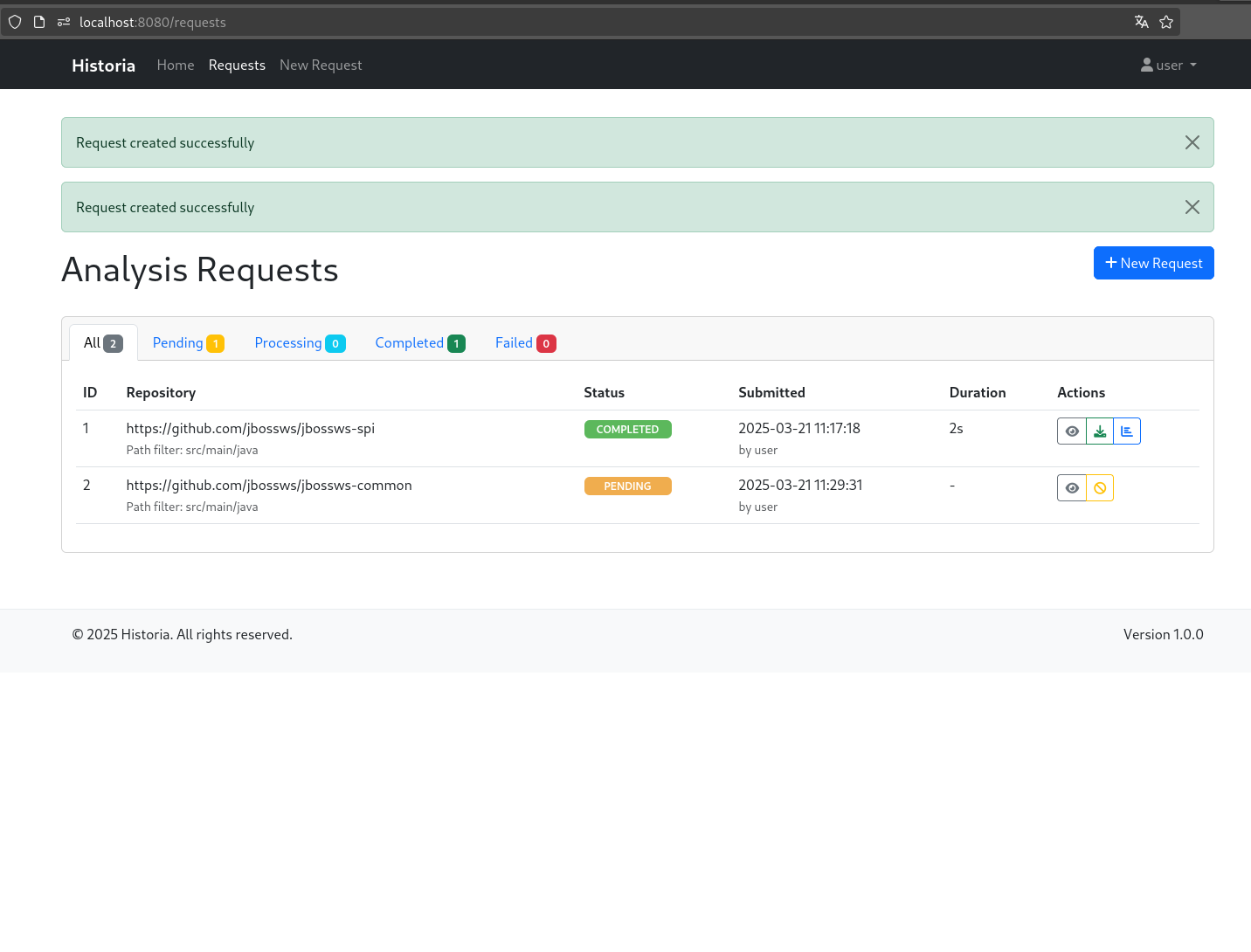
Gone are the days of running Historia exclusively through command-line tools. The new web interface allows you to:
- Submit analysis requests through an intuitive web form
- Track the status of your analyses in real-time
- View detailed results with just a few clicks
- Manage multiple analysis requests from a centralized dashboard
This makes Historia accessible to team members who may not be comfortable with command-line tools, broadening the potential user base within your organization.
Asynchronous Processing
The web application introduces a robust asynchronous processing system that:
- Allows you to submit analysis requests and receive notifications when they’re complete
- Implements a queue system for handling multiple concurrent requests
- Processes analyses in the background without blocking the user interface
- Provides detailed status updates throughout the analysis lifecycle
This means you can submit an analysis for a large repository and continue with other work while Historia processes it in the background.
Interactive Visualizations
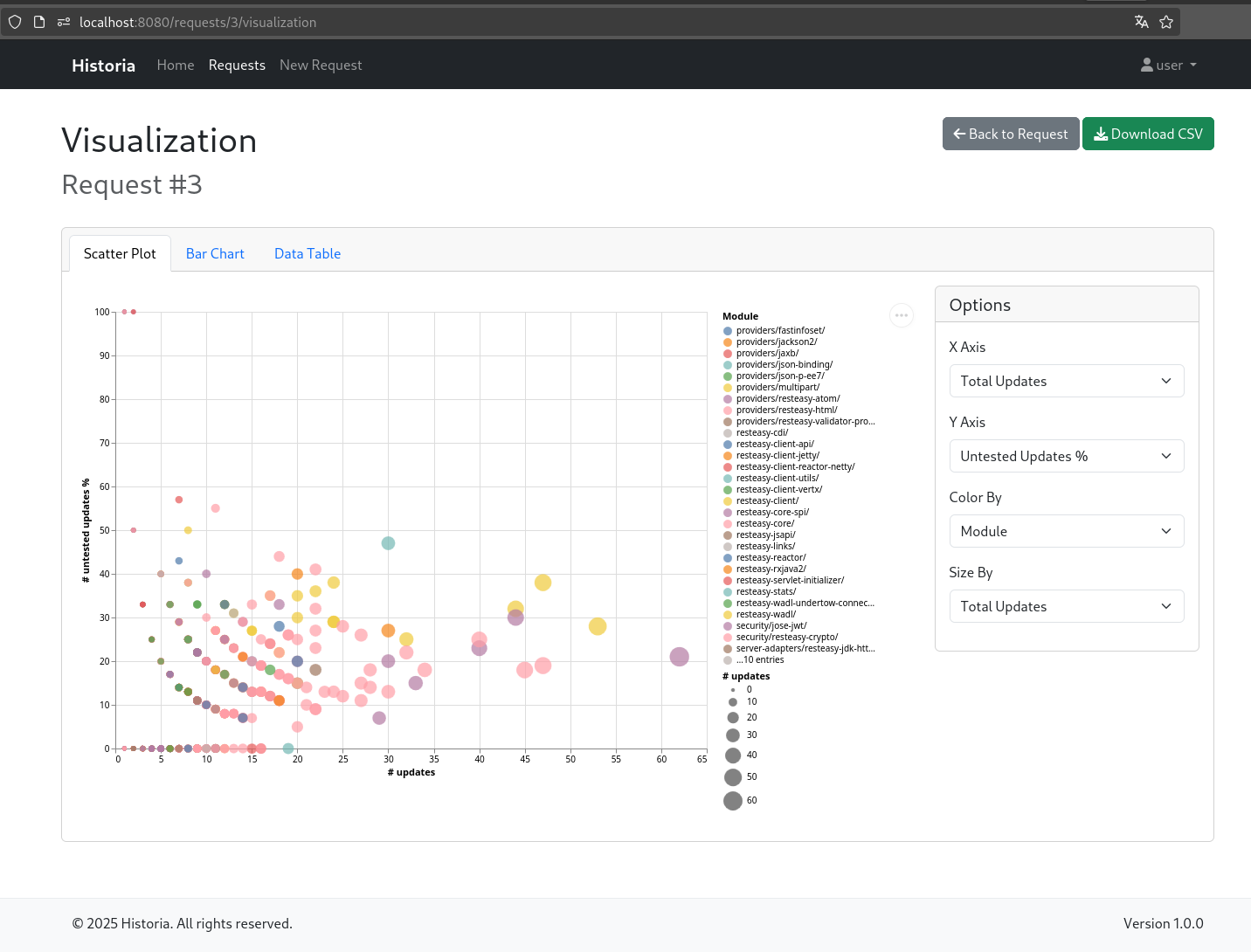
One of the most exciting additions is the new visualization capabilities:
- Dynamic data visualization powered by Vega-Lite
- Multiple visualization types including scatter plots and bar charts
- Customizable views with different metrics and groupings
- Interactive filters to explore your data from different angles
These visualizations make it easier than ever to identify patterns in your test coverage and prioritize areas that need attention. You can quickly spot files with high update rates but low test coverage, or identify modules with a concerning trend of untested changes.
User Authentication and Authorization
The web application includes a comprehensive security model:
- Secure access with user accounts and authentication
- Role-based permissions (user vs. admin roles)
- Private analysis results for each user
- Administrators can view and manage all analyses
This makes Historia suitable for team environments where multiple developers or quality assurance specialists need to work with the same tool but maintain separation of concerns.
RESTful API
For teams that want to integrate Historia into their CI/CD pipelines or other automated workflows, the new RESTful API provides:
- Programmatic access to all features
- Integration capabilities for continuous integration systems
- API endpoints for creating and managing analysis requests
- Access to analysis results in machine-readable formats
Technical Architecture
The web application is built using modern, cloud-native technologies:
- Quarkus - A Kubernetes Native Java stack
- RESTEasy for JAX-RS implementation
- Hibernate ORM for database interactions
- Qute template engine for the web interface
- Bootstrap for responsive design
- Vega-Lite for data visualization
The application follows a clean, layered architecture:
- Model - Domain objects and DTOs
- Repository - Data access layer
- Service - Business logic
- Controller - Web UI controllers
- Resource - RESTful API endpoints
- Templates - HTML templates
Getting Started with the Web Application
Getting started with the Historia web application is straightforward:
- Build the project:
mvn clean install
- Run the web application:
cd web
mvn quarkus:dev
- Access the application at http://localhost:8080
The application comes with two default users:
- Regular user:
- Username:
user - Password:
userpassword - Role:
user
- Username:
- Administrator:
- Username:
admin - Password:
adminpassword - Role:
admin
- Username:
Once logged in, you can:
- Navigate to “New Request” to submit a new analysis
- Enter the Git repository URL and optional path filter
- Submit the request and monitor its progress
- View the results and visualizations when the analysis completes
Future Plans
While 1.0.0.Beta1 represents a major step forward for Historia, there’s still more to come. Future plans include:
- Enhanced visualization options
- Integration with issue tracking systems
- Comparative analysis between different repositories
- Trend analysis over time
- Customizable reporting options
Conclusion
The release of Historia 1.0.0.Beta1 with its new web application module represents a significant evolution for the project. By combining the powerful analysis capabilities of the core module with an intuitive web interface, interactive visualizations, and a RESTful API, Historia is now more accessible and useful than ever before.
I invite you to try out the new web application and share your feedback. Your input will be invaluable as we continue to refine and enhance Historia on the road to a stable 1.0.0 release.
Happy analyzing!